1 # Ventoy [https://www.ventoy.net](https://www.ventoy.net)
2 Ventoy is an open source tool to create bootable USB drive for ISO files.
3 With ventoy, you don't need to format the disk over and over, you just need to copy the iso file to the USB drive and boot it.
4 You can copy many iso files at a time and ventoy will give you a boot menu to select them.
5 Both Legacy BIOS and UEFI are supported in the same way. 420+ ISO files are tested.
6 A "Ventoy Compatible" concept is introduced by ventoy, which can help to support any ISO file.
8 See https://www.ventoy.net for detail.
13 * Fast (limited only by the speed of copying iso file)
14 * Directly boot from iso file, no extraction needed
15 * Legacy + UEFI supported in the same way
16 * UEFI Secure Boot supported (since 1.0.07+)
17 * Persistence supported (since 1.0.11+)
18 * MBR and GPT partition style supported (1.0.15+)
19 * WIM files boot supported (Legacy + UEFI) (1.0.12+)
20 * Auto installation supported (1.0.09+)
21 * ISO files larger than 4GB supported
22 * Native boot menu style for Legacy & UEFI
23 * Most type of OS supported, 420+ iso files tested
24 * Not only boot but also complete installation process
25 * ISO files can be listed in List mode/TreeView mode
26 * "Ventoy Compatible" concept
28 * USB drive write-protected support
29 * USB normal use unaffected
30 * Data nondestructive during version upgrade
31 * No need to update Ventoy when a new distro is released
33 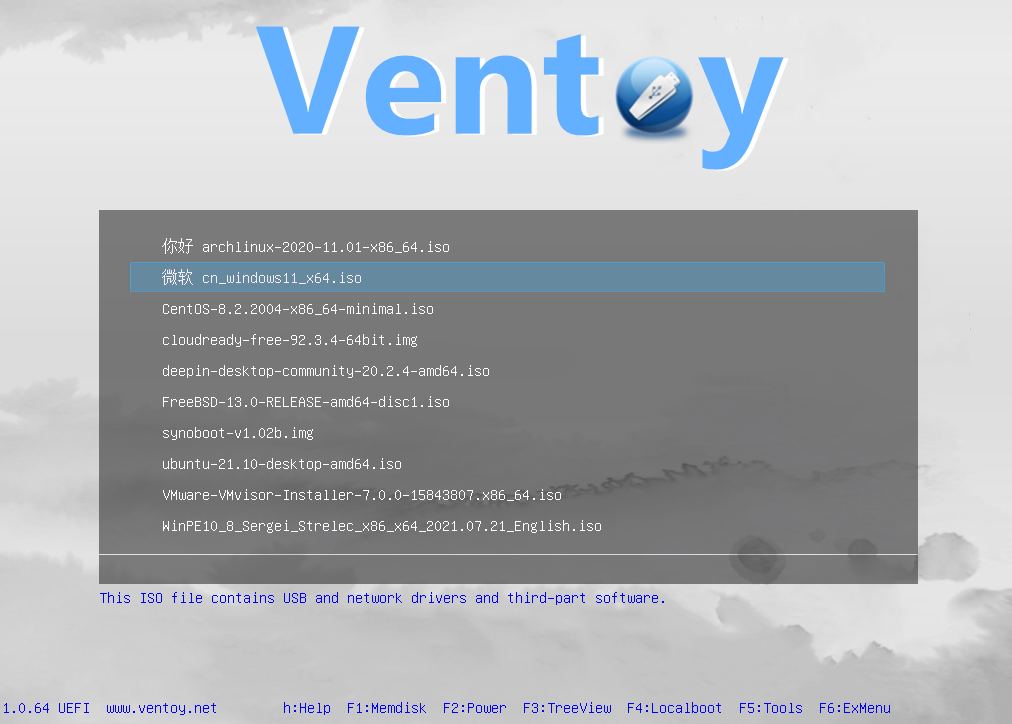
36 # Installation Instructions
37 See [https://www.ventoy.net/en/doc_start.html](https://www.ventoy.net/en/doc_start.html) for detail
39 # Compile Instructions
40 Please refer to [BuildVentoyFromSource.txt](https://github.com/ventoy/Ventoy/blob/master/DOC/BuildVentoyFromSource.txt)
45 **Install & Update** | [https://www.ventoy.net/en/doc_start.html](https://www.ventoy.net/en/doc_start.html)
46 **Customize Theme** | [https://www.ventoy.net/en/plugin_theme.html](https://www.ventoy.net/en/plugin_theme.html)
47 **Global Control** | [https://www.ventoy.net/en/plugin_control.html](https://www.ventoy.net/en/plugin_control.html)
48 **Auto Installation** | [https://www.ventoy.net/en/plugin_autoinstall.html](https://www.ventoy.net/en/plugin_autoinstall.html)
49 **Injection Plugin** | [https://www.ventoy.net/en/plugin_injection.html](https://www.ventoy.net/en/plugin_injection.html)
50 **Persistence Support** | [https://www.ventoy.net/en/plugin_persistence.html](https://www.ventoy.net/en/plugin_persistence.html)
51 **Boot WIM file** | [https://www.ventoy.net/en/plugin_wimboot.html](https://www.ventoy.net/en/plugin_wimboot.html)
52 **Menu Class** | [https://www.ventoy.net/en/plugin_menuclass.html](https://www.ventoy.net/en/plugin_menuclass.html)
53 **Menu Alias** | [https://www.ventoy.net/en/plugin_menualias.html](https://www.ventoy.net/en/plugin_menualias.html)
54 **Menu Extension** | [https://www.ventoy.net/en/plugin_grubmenu.html](https://www.ventoy.net/en/plugin_grubmenu.html)
55 **Memdisk Mode** | [https://www.ventoy.net/en/doc_memdisk.html](https://www.ventoy.net/en/doc_memdisk.html)
56 **TreeView Mode** | [https://www.ventoy.net/en/doc_treeview.html](https://www.ventoy.net/en/doc_treeview.html)
57 **Disk Layout MBR** | [https://www.ventoy.net/en/doc_disk_layout.html](https://www.ventoy.net/en/doc_disk_layout.html)
58 **Disk Layout GPT** | [https://www.ventoy.net/en/doc_disk_layout_gpt.html](https://www.ventoy.net/en/doc_disk_layout_gpt.html)
62 See [https://www.ventoy.net/en/faq.html](https://www.ventoy.net/en/faq.html) for detail
66 [https://forums.ventoy.net](https://forums.ventoy.net)
 projects / Ventoy.git / blob